Two Ways to Play on Your Phone — and Why One Is Safer
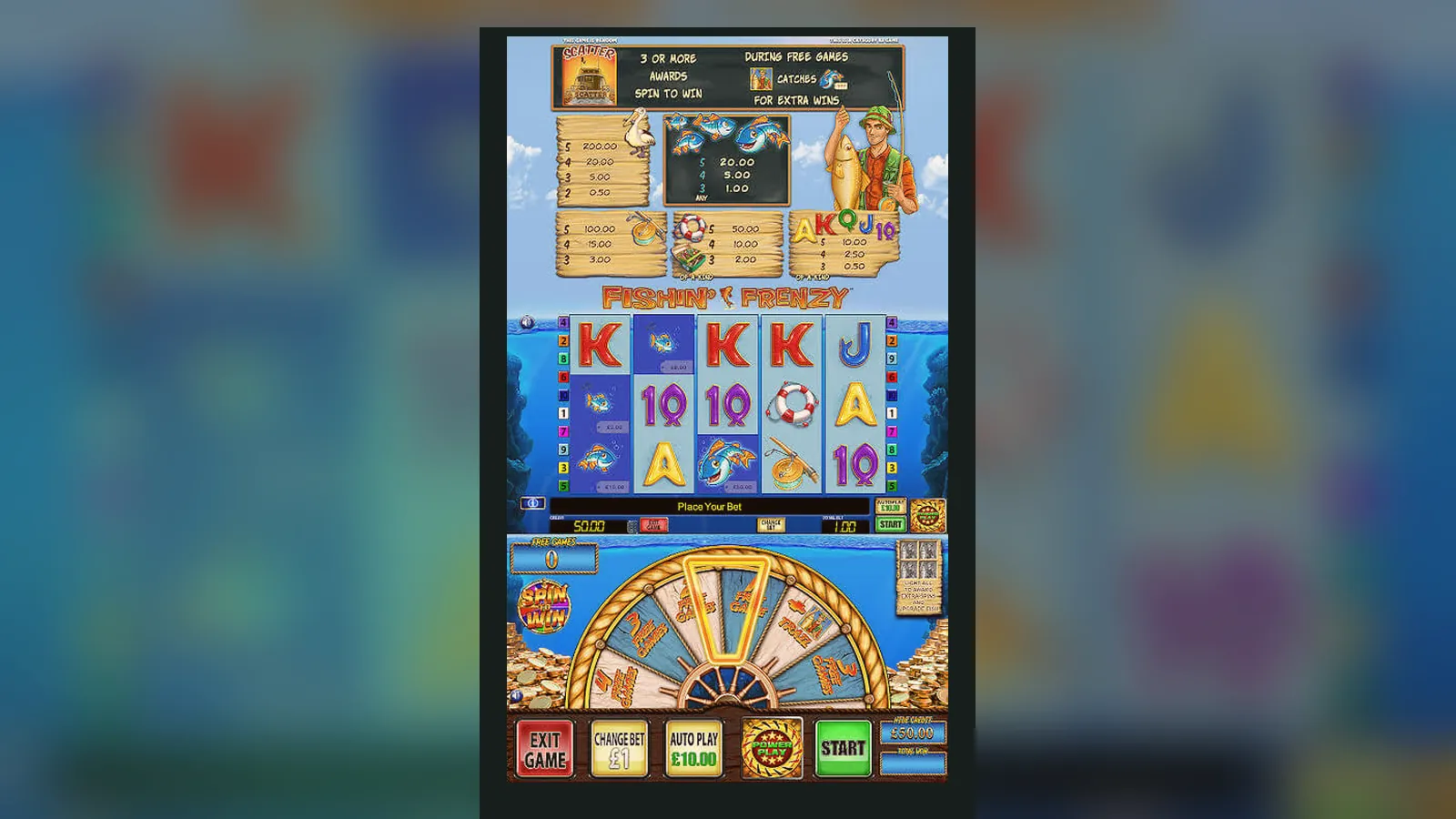
You can play Fishin' Frenzy two ways on a mobile: straight in the browser through a UKGC-licensed site, or via an operator's branded app from the App Store or Google Play. The browser route keeps you inside the regulator's fence—every deposit limit, every affordability check, every GAMSTOP block applies the moment you log in. The app route gives you a shortcut icon and push notifications, but the same UKGC rules sit underneath.
Either way, the game itself is HTML5, so the maths and layout stay identical. What changes is how you reach it, what gets checked before you deposit, and which permissions the wrapper asks for. Below: a store-style breakdown, the install paths step by step, the new-version changelog, and the red flags that mark a dodgy clone.
What the Store Card Would Say
If Fishin' Frenzy lived as a standalone app in the UK stores, the listing would look like this. In reality, most British players meet the game inside a casino operator's app or mobile site, so treat these figures as the wrapper's stats rather than a single-title download.
What You See on Screen
The mobile layout keeps the 5×3 grid in portrait and shifts the paytable and settings into slide-out drawers. Here's what each screen does:
- **Main reel view**: spin button at the bottom, stake selector on the left, balance and last-win counter at the top. The fisherman casts his line across the middle reel whenever a wild lands, and the animation scales down smoothly on smaller screens.
- **Paytable drawer**: swipe up from the bottom edge to see symbol values in £ (the game converts from dollar base maths into your currency). The 10× wild multiplier and free-spins scatter rules sit on the second tab.
- **Settings panel**: tap the cog icon to adjust sound, check game history, set a session reminder, or open the rules PDF. UKGC-licensed sites also place deposit-limit and reality-check links here.
- **Free-spins overlay**: when you trigger the feature, the screen dims and a « Free Spins » banner slides in. The reel set stays the same, but extra fishermen appear on reels 2, 3, and 4 during the bonus.
- **Account drawer**: accessible from the operator's top bar, not the game itself. Here you'll find your deposit limits, GAMSTOP status, transaction history, and the documents upload for KYC (first withdrawal takes 24–48 hours while the operator checks your ID and proof of address).
Four Install Paths — Risk and Steps
Each route to mobile play carries a different blend of convenience and compliance. UKGC checks happen at account level, so even a slick app won't let you skip age verification or affordability screening.
| Method | Steps | Risk level | UKGC coverage |
|---|---|---|---|
| Browser (Safari/Chrome) | 1. Visit UKGC-licensed site; 2. Log in or register; 3. Search « Fishin' Frenzy »; 4. Tap Play | Low—no install, no permissions | Full: deposit limits, stake caps, GAMSTOP block |
| Add to Home Screen | 1. Open game in browser; 2. Tap Share → Add to Home Screen; 3. Icon appears, launches in web view | Low—still browser under the hood | Full—same session, same account rules |
| Operator App (App Store / Play) | 1. Download casino app (e.g. operator's branded app); 2. Log in; 3. Find Fishin' Frenzy in lobby; 4. Tap to load | Low—app vetted by Apple/Google, operator holds UKGC licence | Full—app wraps the same regulated account |
| APK sideload (Android) | 1. Enable « Install unknown apps » in Settings; 2. Download .apk from third-party site; 3. Install manually; 4. Launch and log in | High—no store vetting, potential malware, unlicensed operator risk | None if the site lacks a UKGC licence; GAMSTOP won't block it, your bank won't see RGD on the payment |
The APK route is the one that sidesteps every safeguard: no age gate enforced at install, no automatic deposit-limit prompt, and if the operator isn't in the UKGC public register, your money lands in a grey zone where chargeback rights and dispute resolution don't apply. The other three paths all funnel you into a licensed account, so the protections sit upstream of the app wrapper.
What Your Phone Needs
Fishin' Frenzy runs in HTML5, so the system requirements are light—any device that handles modern web video will cope. Operators typically list:
- **iOS**: 13.0 or later (iPhone 6s onwards); Safari or the operator's in-app browser.
- **Android**: 8.0 Oreo or later; Chrome 90+, or the casino app's WebView component (which uses Chrome's engine under the hood).
- **RAM**: 2 GB minimum—the game assets and animation frames sit in memory, and low-RAM devices will stutter during the free-spins reel swap.
- **Connection**: 3 Mbps down for smooth spin animation; 4G or Wi-Fi. The game will load on slower connections but each spin may lag by a second.
- **Storage**: 50 MB free for cached assets if you play in-browser repeatedly; 100 MB if you install an operator's app (the app bundle includes lobby graphics and other games' thumbnails).
What the App Does Beyond Spinning
A casino operator's app is a lobby wrapper: you're not downloading Fishin' Frenzy in isolation, you're installing a portal to the operator's full library. Once inside, the app:
- Loads the game engine in a WebView (iOS) or Chrome Custom Tab (Android), so you're still playing the HTML5 version—the app just removes the browser chrome and adds a persistent login.
- Caches your session token so you don't re-enter credentials every visit, but UKGC rules require re-authentication after 24 hours of inactivity.
- Sends push notifications for promotions, deposit reminders, and (if you've set one) session time-limit alerts. You can disable these in system settings without affecting gameplay.
- Syncs your balance, transaction history, and responsible-gambling settings across devices—log in on desktop and your deposit limit follows you to mobile.
- Handles KYC document uploads: tap the account menu, photograph your driving licence or passport, submit for review. First withdrawal won't process until this clears (24–48 hours is normal).
- Displays your GAMSTOP status in the account drawer—if you've self-excluded, the app will lock you out at login and show the remaining block period.
The game itself doesn't phone home separately; every spin, win, and balance update routes through the operator's server, which logs the session for UKGC audit trails.
Version 3.1.8 Changelog — What Changed
Blueprint's December 2025 update brought three changes to the mobile build, all focused on compliance and performance rather than gameplay features:
- **Stake-cap enforcement on the client side**: the game now reads your age bracket from the operator's session data and greyed out stakes above £2.00 for players aged 18–24, and above £5.00 for everyone else. Previously, the operator's backend would reject over-limit bets, but the UI would still show the higher stakes as tappable—now they're visually disabled.
- **Faster free-spins load on 4G**: the reel-swap animation and fisherman sprites are now served from a CDN edge node closer to UK players, shaving 300–500 ms off the transition. On Wi-Fi you won't notice; on mobile data, the delay between trigger and first free spin dropped from two seconds to one.
- **Improved reality-check modal**: when your session hits the time threshold you set (or the operator's default, usually 60 minutes), a full-screen overlay now pauses autoplay and shows elapsed time, net win/loss, and a « Continue » vs « Take a Break » choice. The old version let autoplay continue while the modal sat in the corner.
Spotting a Fake Clone and Risky Permissions
Clones proliferate because Fishin' Frenzy is a known name, and scammers bet that players searching « Fishin Frenzy APK » or « Fishin Frenzy app download » will grab the first result. Here's how to avoid them:
- **Check the UKGC register**: before you deposit, look up the operator in the UK Gambling Commission's public register and match the licence number in the site or app footer. If the number is missing, invented, or belongs to a different company, you're outside regulated territory.
- **Developer name in the store**: legitimate casino apps list the operator's legal entity as developer (e.g. « Operator Ltd »), not « Blueprint Gaming » or « Fishin Frenzy Team ». Blueprint licenses the game to operators; they don't publish consumer-facing apps.
- **Clone red flags**: misspelt name (« Fishing Frenzy », « Fish'n Frenzy »), generic developer name (« Casino Games Studio »), or a store listing with zero reviews and a « last updated 2019 » timestamp. Scam apps often recycle old casino templates and slap popular game names on top.
- **APK hash mismatch**: if you must sideload, compare the .apk file hash (SHA-256) against the operator's published checksum. If the operator doesn't publish hashes, that's a signal not to sideload at all—use the browser instead.
- **Permission overreach**: the game itself needs no special permissions. A casino app reasonably asks for: – **Storage** (Android): to cache lobby assets and game thumbnails. – **Camera** (optional): for KYC document upload—you can deny this and upload photos from your gallery instead. – **Notifications** (optional): for promotion alerts and session reminders. Any request for Contacts, Call Logs, SMS, Location (beyond coarse IP geolocation for licence-zone checks), or Accessibility is a red flag—legitimate casino apps don't need those, and granting them hands a scammer access to your personal data.
If an app or APK asks for SMS permissions « to verify deposits », walk away—real operators use two-factor authentication through a separate authenticator app or email, never by reading your message inbox.
FAQ
Do I need to download an app to play Fishin' Frenzy on mobile in the UK?
No—open Safari or Chrome, visit a UKGC-licensed casino, log in, and search for the game. The HTML5 version runs in-browser with no install. An operator's app is optional and mostly adds a shortcut icon and push notifications; the game, limits, and checks stay identical.
Why does the app ask for my documents before I can withdraw?
UKGC rules require age and identity verification before the first withdrawal. Operators check your driving licence or passport, a utility bill or bank statement for address proof, and sometimes a photo of your debit card (middle digits hidden). Processing takes 24–48 hours, after which withdrawals to Faster Payments or e-wallets clear in a few hours to two working days.
Can I bypass the £5 stake cap by installing an APK from an unlicensed site?
Technically yes, but you'd be playing outside UKGC regulation—no GAMSTOP protection, no deposit-limit tools, no recourse if the operator vanishes with your balance, and your bank may flag the transaction as high-risk since Remote Gaming Duty isn't paid. The legal risk sits with the unlicensed operator, but the financial risk lands on you.
What happens if I self-exclude through GAMSTOP and then download a casino app?
Every UKGC-licensed operator checks the GAMSTOP register at login. The app will let you install, but when you try to log in or register, the system will block you and display your remaining exclusion period (6 months to 5 years). Unlicensed apps and sites don't query GAMSTOP, which is why the regulator warns against them.
Does the mobile version pay out the same RTP as desktop?
Yes—the game engine is identical across devices. RTP, volatility, hit frequency, and maximum win are set in the server-side configuration, not the client wrapper. Whether you play in Chrome on a laptop or Safari on an iPhone, the maths and expected return stay the same.
How do I know the game version I'm playing is the latest?
In the game's settings panel (cog icon), scroll to the bottom—most operators display the game version and build date there. If you're playing in-browser, clear your cache (Safari: Settings → Safari → Clear History and Website Data) and reload the game; the server will push the newest version. Operator apps auto-update the game engine when you launch, so you're rarely more than a day behind the current release.